SHE Onsite home

Health and safety for your whole crew, at one price.

Site sign-in, hazard reports, roll call and your registers, on the phones your crew already carry and any computer in the office. Every plan has every feature, and monthly plans have no lock-in.

From NZ$49 a month plus GST

How many on your crew?
TradeUp to 5 active workersNZ$49 a month plus GST

Visitors are free. So are a contractor's people who sign in at the gate or on the site phone without a login.

Your 30-day free trial. No card needed.

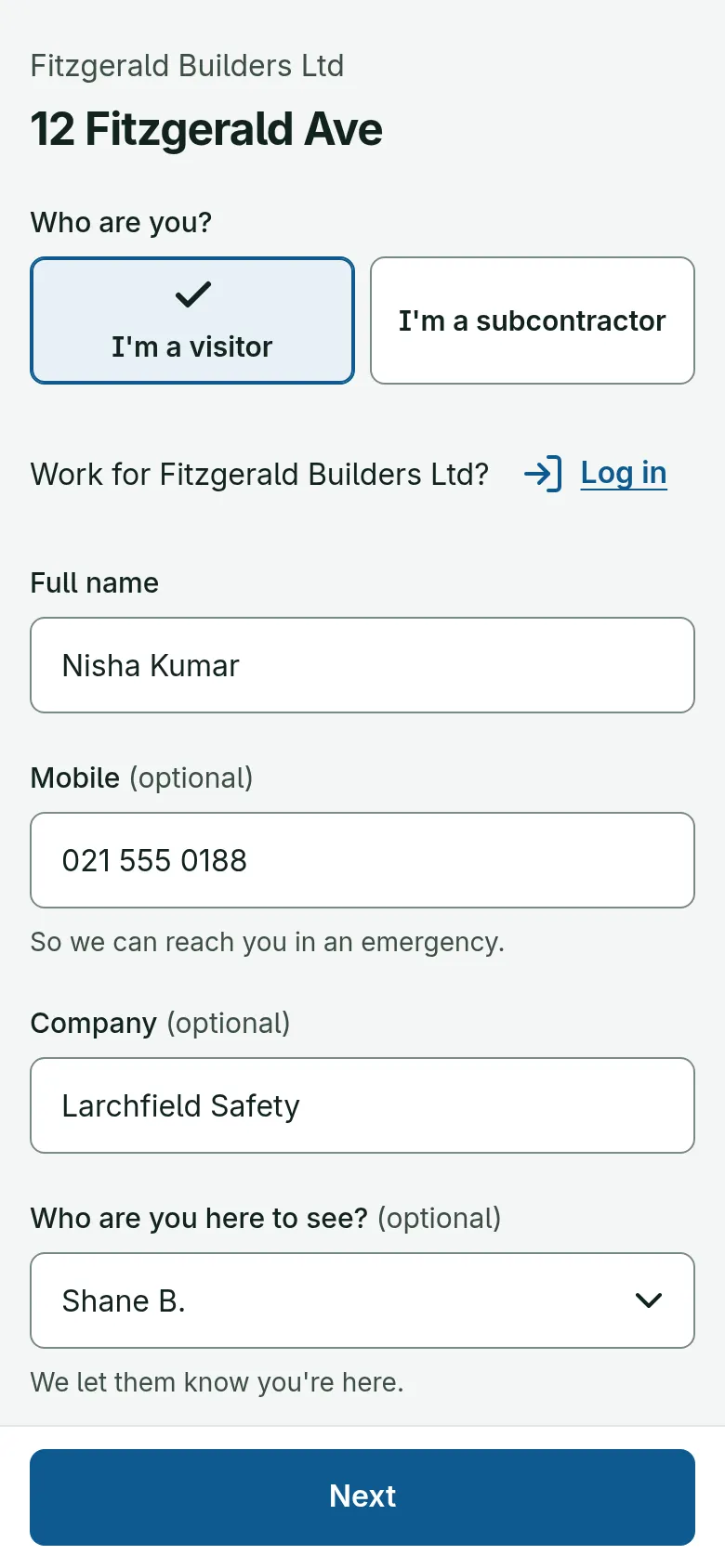
A visitor signing in at 12 Fitzgerald Ave: I'm a visitor, with their name, mobile, company and who they're here to see
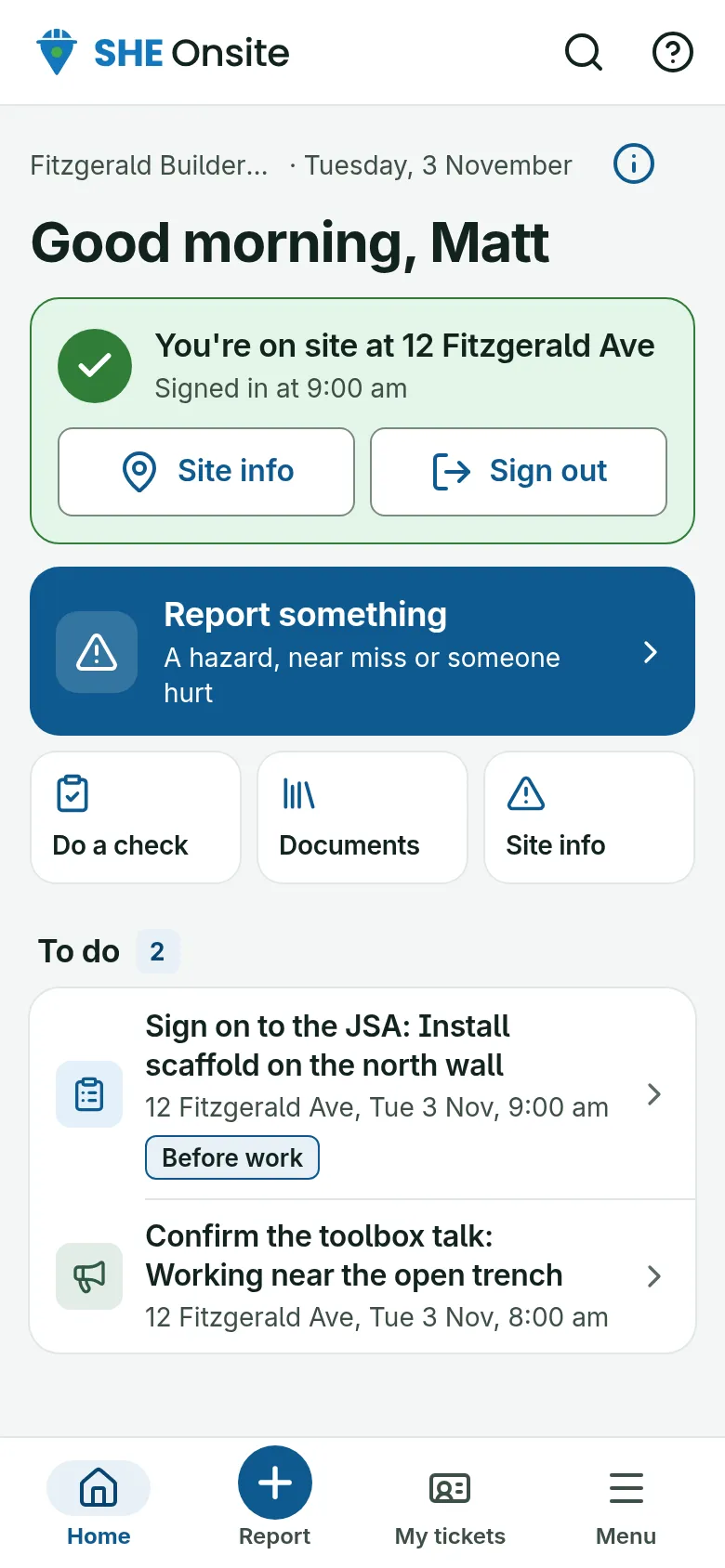
A worker's home screen: on site at 12 Fitzgerald Ave, with a JSA to sign on to and a toolbox talk to confirm

A day on site

Follow one working day at an example site, from signing in at the gate at 7:00 am to the roll call at 3:00 pm, in about half a minute.

Animation of SHE Onsite, simplified: a day on site at 12 Fitzgerald Ave
  1. 7:00 am at the gate. Scan the poster to sign in. Visitors need no app.
  2. 7:20 am, toolbox talk. The crew confirm they were there, on their own phones.
  3. 10:40 am, no signal. The hazard report waits on the phone, then sends with the time you tapped.
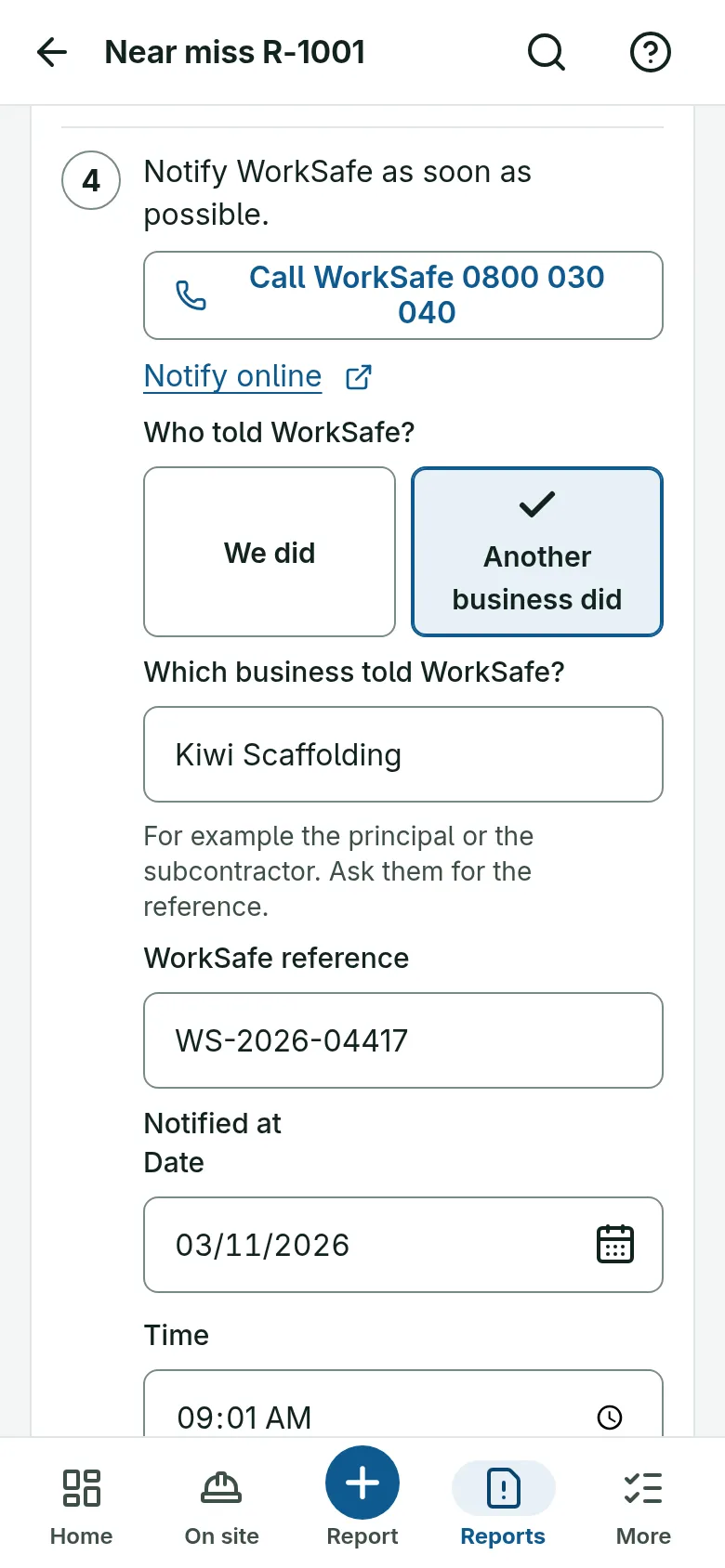
  4. 1:15 pm. A report is flagged as possibly notifiable. The WorkSafe steps stay on screen until a decision is recorded.
  5. 3:00 pm, a drill. Everyone is accounted for, the office sees it, and the evidence pack is ready.

An animation of about half a minute showing one day at an example building site, 12 Fitzgerald Ave, in five chapters.

  1. 7:00 am at the gate. Scan the poster to sign in. Visitors need no app. A visitor, Sam Ellis, signs in on their own phone and the office's count of people on site goes from 3 to 4.
  2. 7:20 am, toolbox talk. The crew confirm they were there, on their own phones. Three ticks land beside the crew's names: 3 of 3 confirmed.
  3. 10:40 am, no signal. The hazard report waits on the phone, then sends with the time you tapped. It reads Not sent yet, then Sent at 11:12 am, and still shows Tapped 10:40 am.
  4. 1:15 pm. A report is flagged as possibly notifiable. The WorkSafe steps stay on screen until a decision is recorded. A person answers Possibly, four WorkSafe steps show and two are ticked, and a banner in the office says a WorkSafe decision is needed.
  5. 3:00 pm, a drill. Everyone is accounted for, the office sees it, and the evidence pack is ready. Four names are ticked Safe: 4 of 4 accounted for.
Animation of SHE Onsite, simplified. Example company and site.

What does the office see?

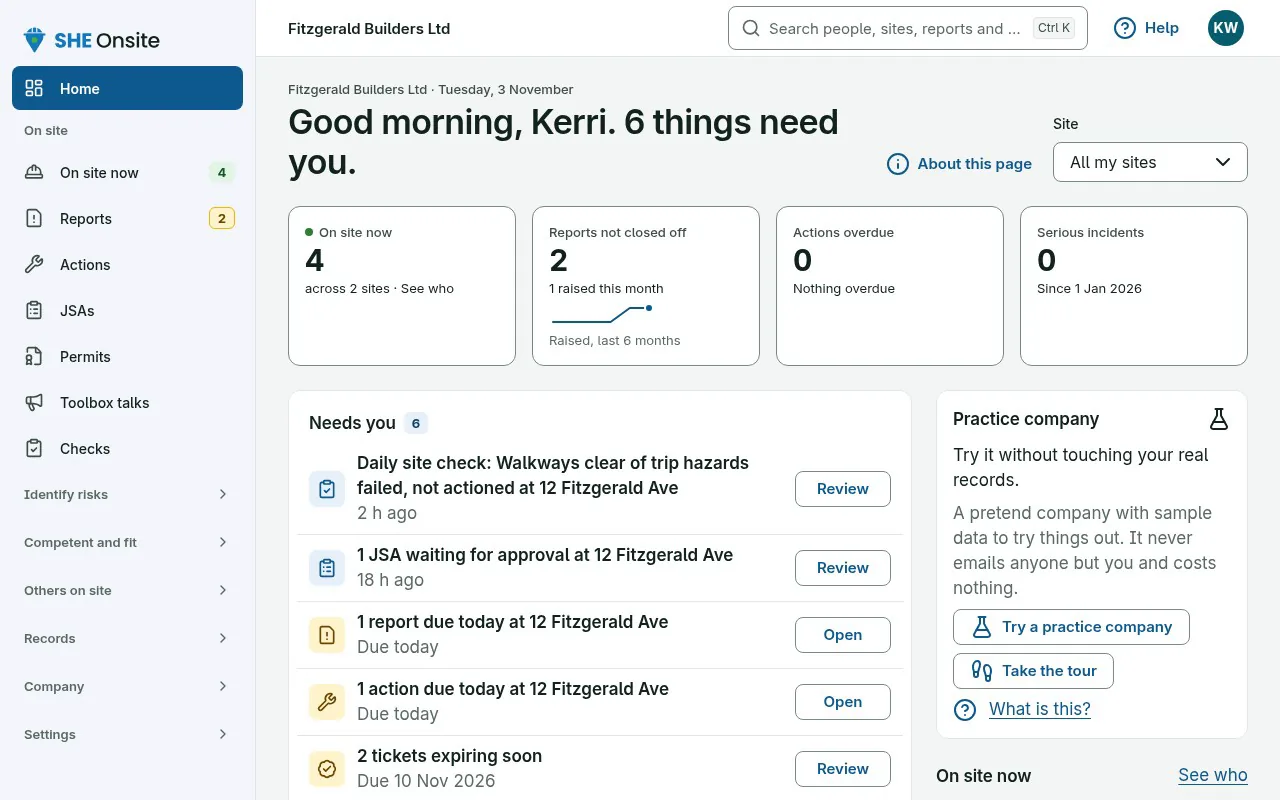
What the crew send from site lands in the office, in one list. It opens in any computer's web browser and shows what needs you today, with the most urgent at the top.

Kerri's Home on the office computer after she saved her decision: Good morning, Kerri. 6 things need you. (open full size)

One list of what needs you

Reports to check, JSAs to approve, failed checks to follow up and tickets about to expire, in one list.

Who is missing a ticket

Say what each job needs. SHE Onsite shows who has it, who is missing it and what is about to expire.

The month's numbers, counted for you

Inspections, toolbox talks and reports for the last 12 months, worked out from the records you already keep, with a board report to download each month. Check how each one is worked out before you rely on it.

Does everyone on the crew need the app?

No. Visitors sign in with their phone's camera, with no app and no account. Your crew add SHE Onsite to their home screen, and anyone without a smartphone uses the shared site phone.

Visitors
Scan the QR poster at the gate with the phone's camera and type their name. No app and no account.
Free
A contractor's people without a login
Sign in at the gate or on the site phone. They don't need a login.
Free
Your crew
Open the invite, add SHE Onsite to the home screen and log in with an email code or their fingerprint, face or device PIN. No password to forget.
In your plan
People without a smartphone or email
Use the site phone at the gate: pick their name and type a 6-number PIN.
In your plan
The office
Any computer's web browser. See who's on site, what needs you and every register.
In your plan

Nothing to install from an app store

It runs in the phone's web browser and sits on the home screen like any other app.

Saves with no signal, sends later

Sign-ins, reports and checks save with no signal and send later, with the time you tapped. The first open on a phone needs signal.

A shared site phone

For people without their own phone or email address: they pick their name and type a PIN.

What does SHE Onsite do on site?

It handles the moments that matter on a working day: who's here, what went wrong and who's safe. Here are six, as they look in the app.

Sign in at the gate with a QR poster

Print the poster and put it up at the gate. Workers scan it and tap Sign in. The office sees who's on site straight away.

  • Site rules shown before they sign in
  • Visitors type their name, with no app and no account
  • Sign out at the end of the day

More about site sign-in

Screen recording of the appA visitor opens the site's QR link on their phone, types their name and company, reads the site rules and ticks that they've read them, then taps Sign in and sees You're signed in. No app and no account.

Report a hazard, near miss or incident in under a minute

Tap Report, choose what happened, add a photo and send. Your site manager is told straight away. If someone is seriously hurt, the app tells you to call 111 first.

  • A photo straight from the camera
  • A reference number, and an update when it's fixed

More about reporting

Screen recording of the appMatt taps Something unsafe I've spotted, takes a photo, types what was seen and where, chooses Serious and taps Send report. The app says thanks and who the report has gone to.

Roll call from the list of who's signed in

In an emergency, start a roll call from everyone signed in to the site. Tap each person as they reach the assembly point. It saves on the phone with no signal and sends later.

  • Call buttons for anyone not found
  • The assembly point and emergency plan at the top
  • Run a drill to test your plan

More about who's on site

Screen recording of the appShane starts a roll call from the list of who's signed in at 12 Fitzgerald Ave, with the site's emergency plan linked, and taps each person as they reach the assembly point, until all 4 are accounted for. Then Finish roll call, and the app shows Everyone is accounted for.

A shared site phone for people without their own

Set up a phone or tablet at the gate. Workers pick their name and type a 6-number PIN to sign in, report something or answer a toolbox talk.

  • No email address needed
  • Who's on site, at the gate, for an emergency

More about the site phone

Screen recording of the appOn the site phone at the gate, Matt taps Sign in to site, picks their name and types a 6-number PIN. Then a tick to say the site rules are read, Sign in, and the phone says Matt is signed in to site.

Could it be notifiable? The WorkSafe steps, on screen

When you flag a report as possibly notifiable, the app walks you through the WorkSafe steps. The report stays at the top of the office's Home screen until the decision is recorded.

  • Death, notifiable injury or illness, or notifiable incident, in plain words
  • Who told WorkSafe, and the reference, kept with the report

You decide whether it is notifiable, and you tell WorkSafe yourself. The app keeps the record.

More about notifiable events

Screen recording of the appShane opens a near miss, taps Decide what to do, answers Possibly to Could this be a notifiable event? and chooses Notifiable incident. Once that is saved, the WorkSafe steps appear on the report, starting with making sure everyone is safe.

An evidence pack when someone asks

Choose a site and dates and download one zip of its registers, toolbox talks, checks and JSAs: what a principal or an auditor asks for.

  • Email the principal a short summary of a report
  • Injury and health details are never in a pack

More about registers

Screen recording of the appKerri, the admin, opens Evidence pack for 12 Fitzgerald Ave, checks the dates and what goes in, and taps Download pack. The pack downloads to the phone as one zip file.

And the records behind them

Every register lives in the same app, with PDFs and spreadsheet exports when you need them.

See every feature

  • Hazardswith the risk before and after your controls
  • Plantwith pre-start checks for each machine
  • Substanceswith their safety data sheets on site
  • Contractorsand their documents, reviewed
  • Training and ticketsand who is missing one
  • Documentsthat people read and confirm
  • Health monitoringfor work that needs regular health checks
  • JSAs and checkscrew sign-on, toolbox talks, pre-starts, inspections and your own checklists

Is it made for New Zealand health and safety law?

It uses the terms of the Health and Safety at Work Act 2015, walks you through the WorkSafe steps when you flag a report as possibly notifiable, and includes Tōtika readiness. You still make the decisions; the app keeps the record.

When something could be notifiable

When you flag a report as possibly notifiable, the app walks you through the WorkSafe steps. Each step is ticked with who did it and when.

  1. Make sure everyone is safe and anyone hurt is getting help.
  2. Keep the scene as it is until WorkSafe says otherwise.
  3. Decide: is this a notifiable event?
  4. Notify WorkSafe as soon as possible, then record who did it.

Guidance, not legal advice. Recording it in the app does not tell WorkSafe. If you're unsure, contact WorkSafe.

WorkSafe step 4: Notify WorkSafe as soon as possible, with who told WorkSafe and the WorkSafe reference

Tōtika Small and Large readiness, in every plan

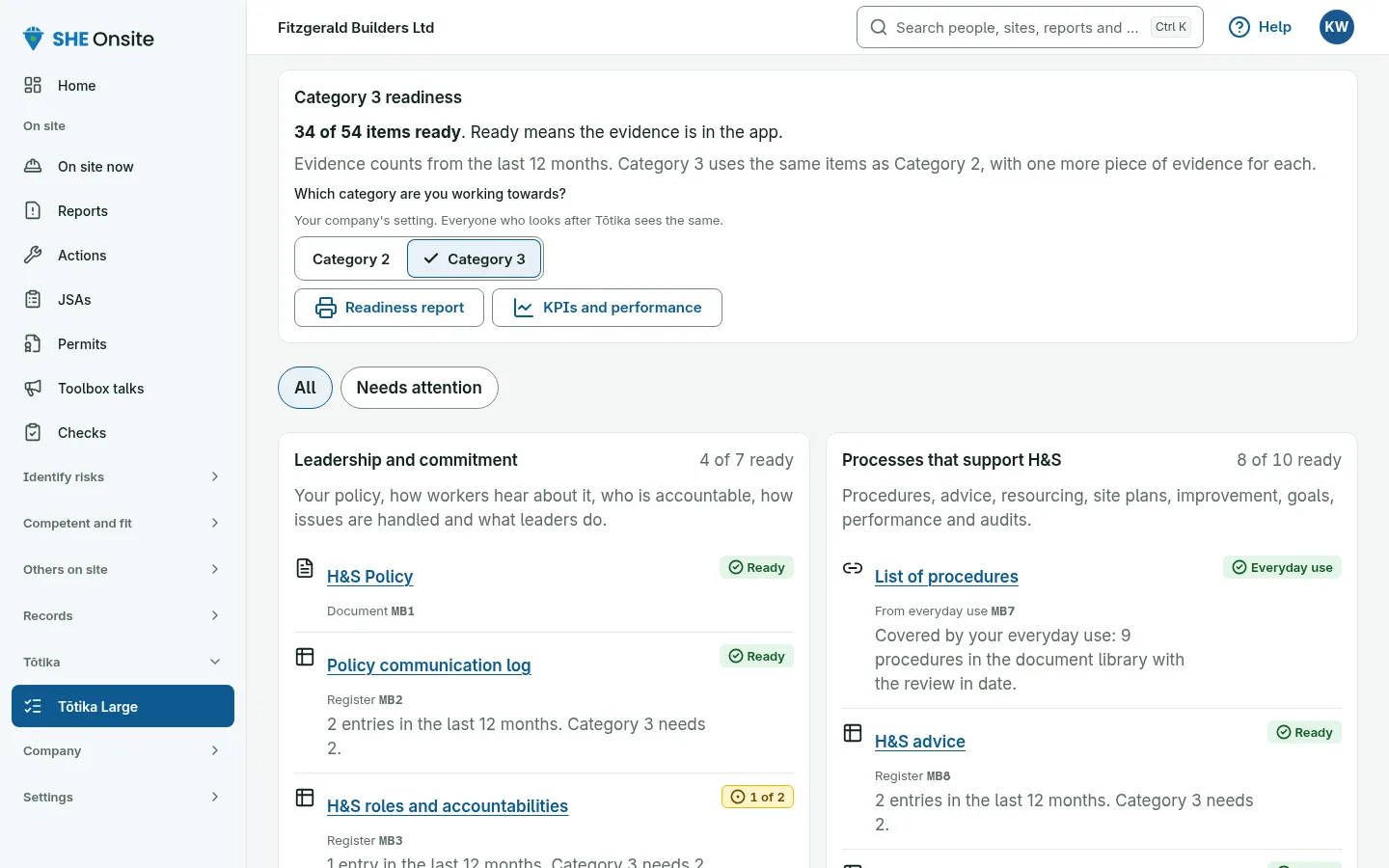
See which Tōtika items already have evidence in the app and what's still missing, for Category 1, 2 or 3. Tōtika Small and Large readiness is included. It helps you organise your evidence. It doesn't assess or certify you, and it is not endorsed by Tōtika.

More about Tōtika readiness

Category 3 readiness: 34 of 54 items ready, grouped by Leadership and commitment and Processes that support H&S

How much does SHE Onsite cost?

From NZ$49 a month plus GST, set by how many active workers you have. Every plan has every feature, and monthly plans have no lock-in.

Trade

Up to 5 active workers

NZ$49a month plus GST

or NZ$529.20 a year plus GST

Crew

Up to 15 active workers

NZ$99a month plus GST

or NZ$1,069.20 a year plus GST

Site

Up to 50 active workers

NZ$249a month plus GST

or NZ$2,689.20 a year plus GST

Company

Up to 150 active workers

NZ$599a month plus GST

or NZ$6,469.20 a year plus GST

Enterprise

More than 150 active workers

Talk to us

What is an active worker?

Someone who signs in to a site or records something: a report, a check, a JSA or a toolbox talk during the month (a calendar month, New Zealand time). Logging in just to look doesn't count. Visitors are free. So are a contractor's people who sign in at the gate or on the site phone without a login. Going over your plan never blocks anyone: we let you know and suggest a bigger plan.

Pay yearly and save 10%

Pay for a year up front and save 10% on any plan, or pay month by month.

No lock-in on monthly plans

Pay monthly with no lock-in: cancel any time and billing stops at the end of the month you've paid for. Yearly plans are paid for the year and not refunded.

Your 30-day free trial. No card needed.

Every plan includes

  • Site sign-in by QR poster
  • Visitors free
  • Roll call and drills
  • Hazard, near miss and incident reports
  • Notifiable-event steps
  • Saves with no signal and sends later
  • Hazard, plant and substance registers
  • Contractors and their documents
  • Training and tickets
  • Documents with read and confirm
  • Site safety plans from your records
  • Health monitoring
  • JSAs, toolbox talks, pre-starts and inspections
  • Checklist builder
  • Site phone with PINs
  • Tōtika Small and Large readiness
  • Monthly numbers and a board report
  • Alerts and a daily reminder email
  • Reminders for yourself and your crew
  • Evidence packs, PDFs and CSV exports
  • Your logo and colours on every PDF
  • Imports from spreadsheets
  • Ask, for help when you're stuck

From sign-up to your first site in under 10 minutes

Sign up, add your first site and print its QR poster yourself, with no call and no sales meeting.

  1. Type your company's name, your name and your email. No card.
  2. Type the 6-number code we email you, and you're logged in. It's free for 30 days, with no card.
  3. Want quicker logins? Save a passkey: your fingerprint, face or device PIN, and keep the recovery code it gives you. Or tap Not now and keep using email codes. No password, ever.
  4. Add your first site and print its QR poster for the gate. Your crew can sign in to site from tomorrow.

Your 30-day free trial. No card needed.

Screen recording of the app

Which industries is SHE Onsite for?

Any New Zealand business with people on site. The starter hazards are written for construction work today; every other crew uses the same tools with its own hazards and checks.

Construction and trades

Builders, electricians and plumbers, roofing and scaffolding, and civil and infrastructure crews. The starter hazards are construction hazards, each a starting point to check against your own site.

Works for any crew

Sign-in, reports, roll call and registers work the same way for every crew. You add your own hazards and checks with the checklist builder, or import your hazard register from a spreadsheet.

  • Landscaping and arborists
  • Forestry
  • Farming
  • Manufacturing and warehousing
  • Transport
  • Facilities and cleaning

More about industries

Are you a health and safety consultant?

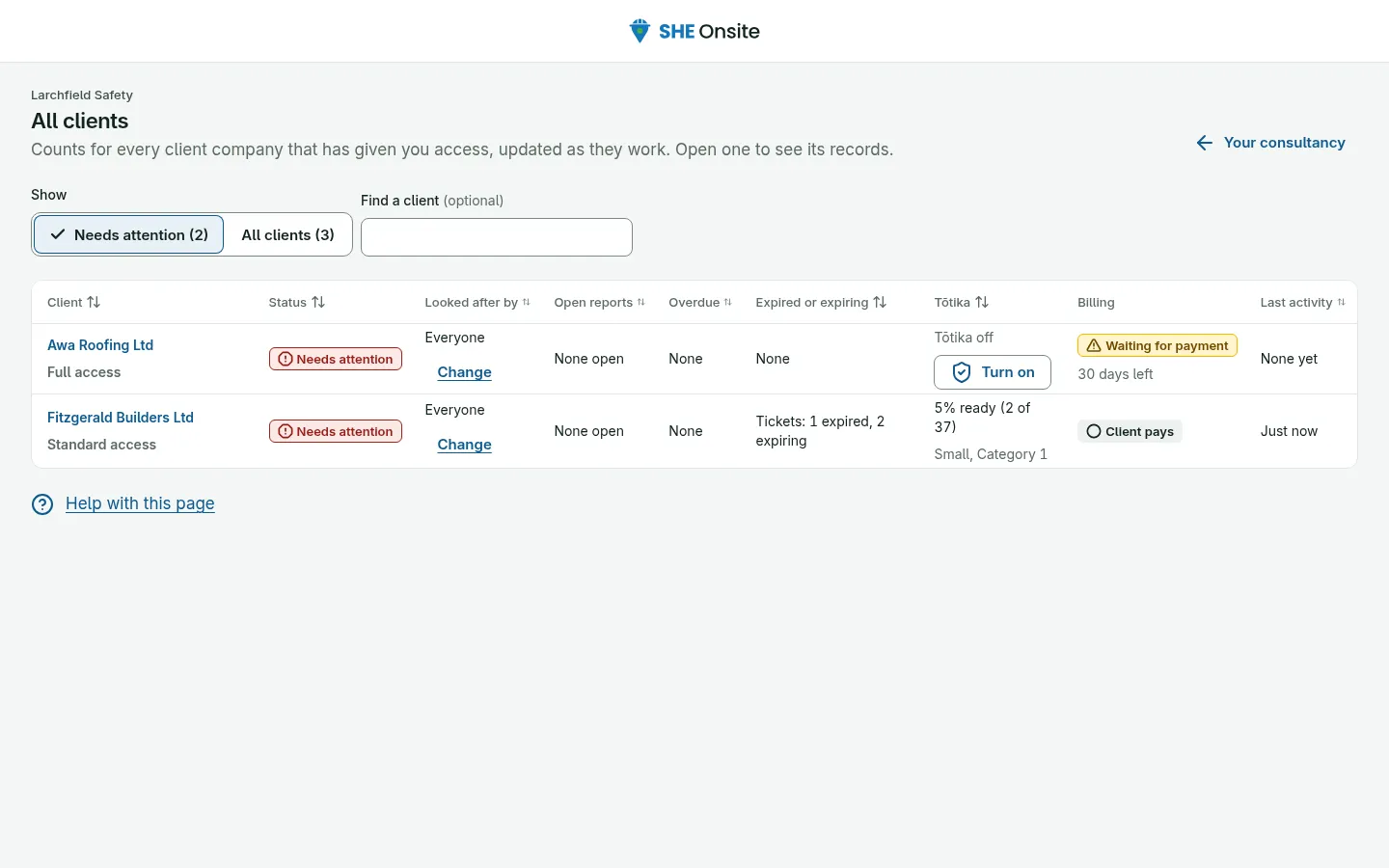
See all your clients at a glance, with the access each client gives you. There's no charge for consultancies: each client pays for their own plan, or you pay for them.

Each client company keeps its own records and chooses what you can see. Needs you lists what's waiting across every client, most serious first.

More for consultants

All clients for Larchfield Safety: client companies with their status, who looks after them, open reports, Tōtika and billing

Can I move across from another app or a spreadsheet?

Yes. Import your sites, tickets and training, hazards and contractors from a spreadsheet. And if you ever leave, download everything.

Bring your records in

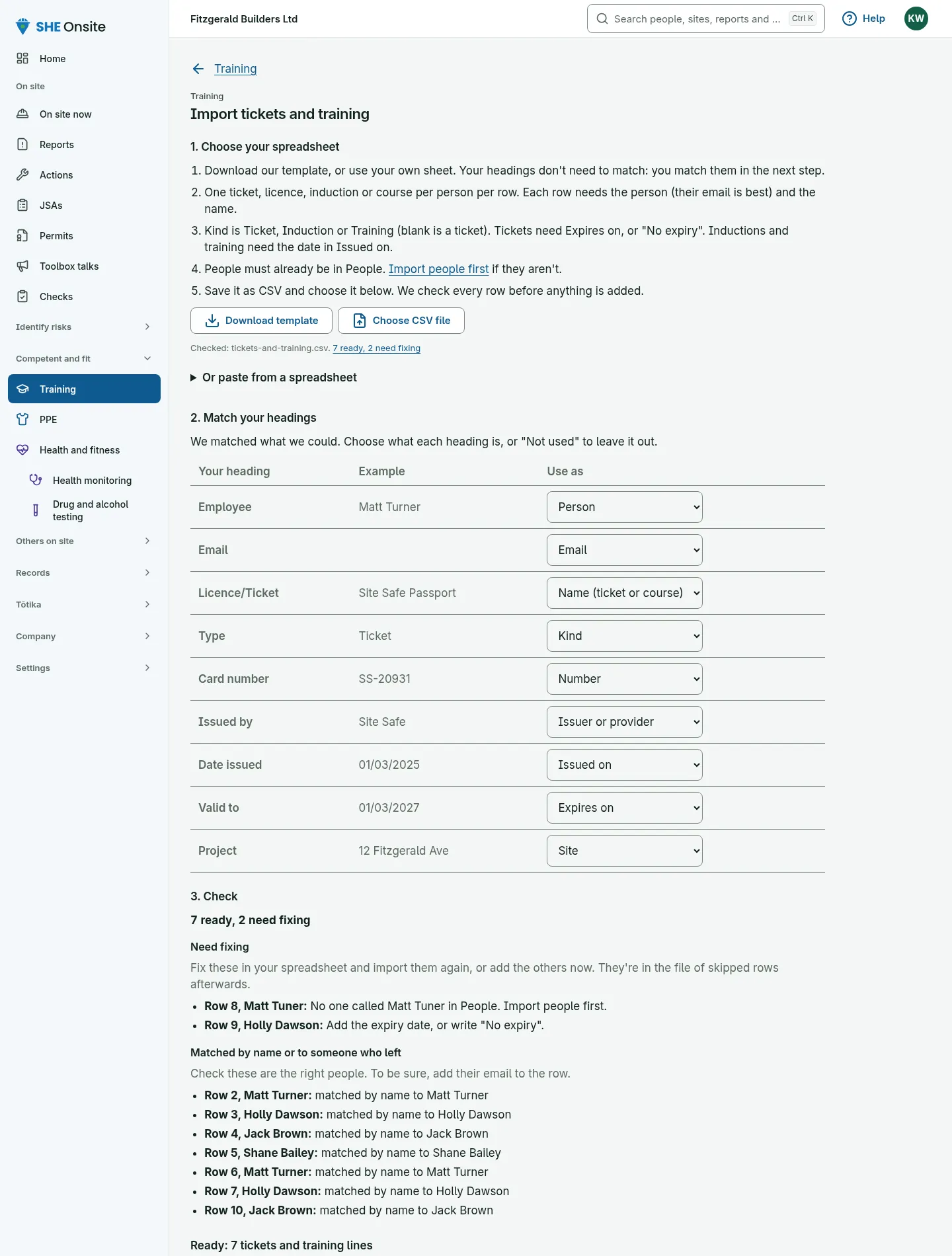
Use our template or your own sheet. Its headings are matched for you to check, every row is checked before anything is added, and you can remove an import for 7 days. You can also add a folder of ticket photos, safety data sheets and contractors' certificates in one go, matched to their records by file name.

Importing tickets and training from a spreadsheet, matching its headings

Take everything with you

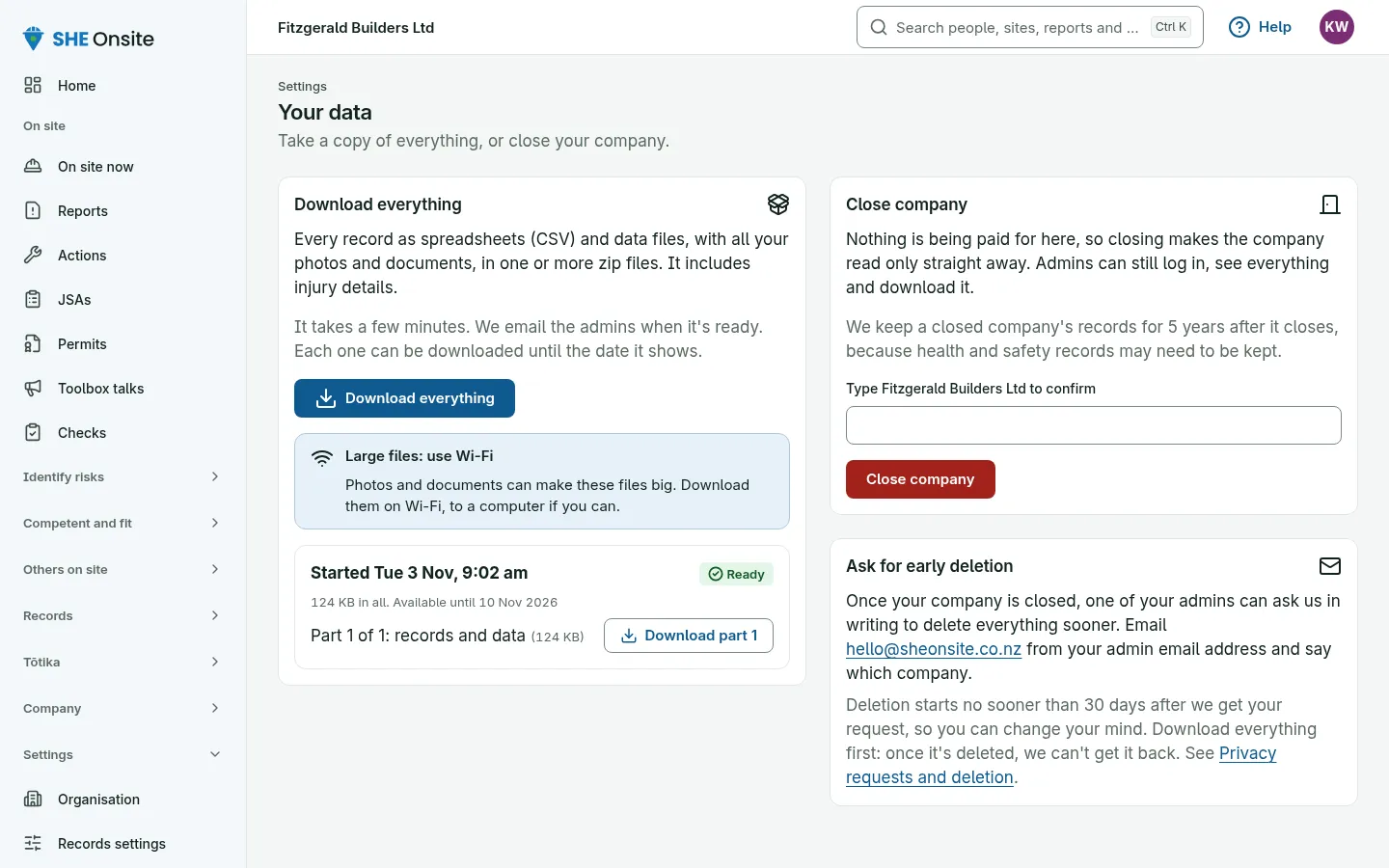
Your records belong to your company. Download everything as zip files: a spreadsheet for each kind of record, plus every photo and document.

Your data: Download everything, with a download ready

What if I get stuck?

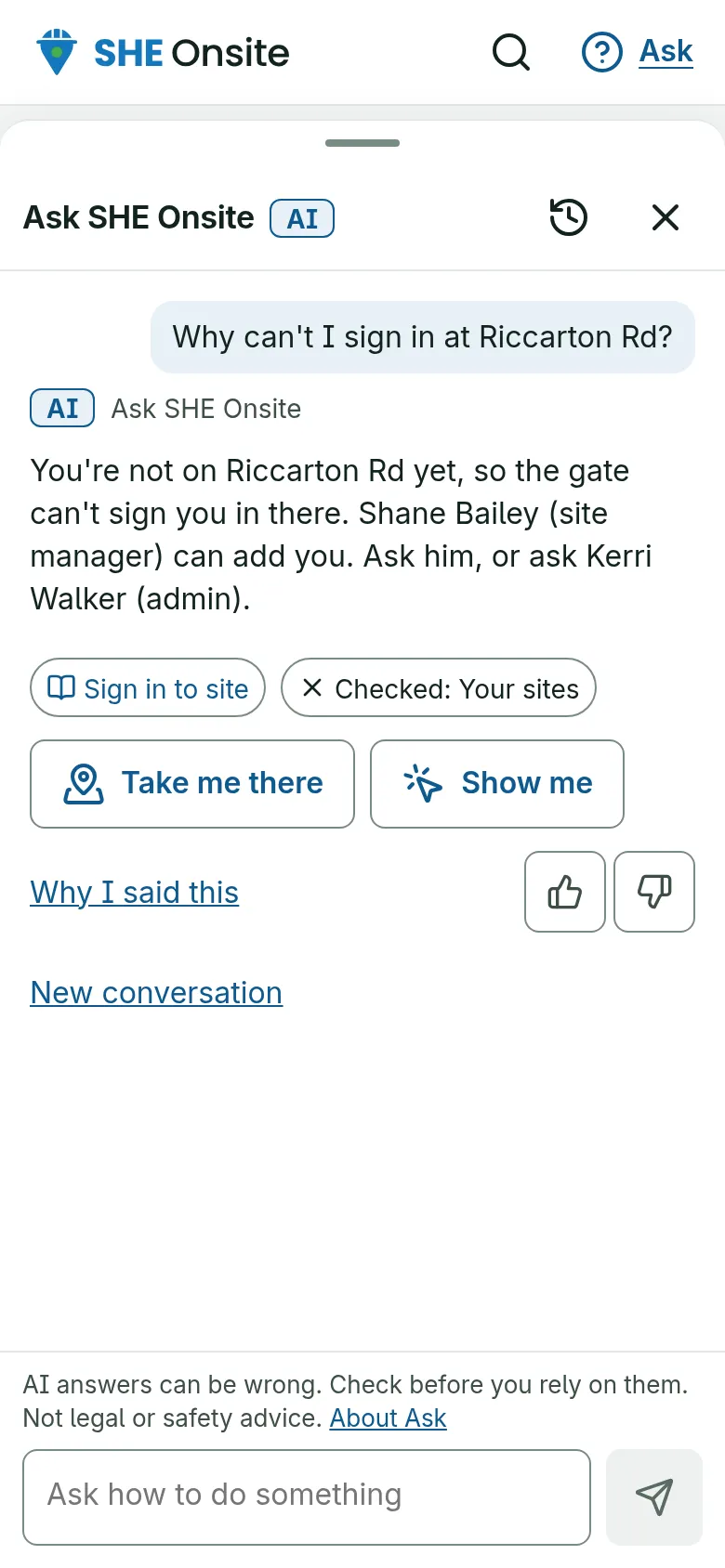
Help when you're stuck: step-by-step guides, tips on each page, and Ask. Type a question in your own words and get a short answer with where it came from.

Check an answer before you rely on it. The help guides and Contact support are always there too.

Ask answering why someone can't sign in at Riccarton Rd, with Take me there and Show me buttons

Questions people ask

Short answers first. The help guides have the steps.

How much does SHE Onsite cost?

From NZ$49 a month plus GST for up to 5 active workers, up to NZ$599 for 150. Over 150, talk to us. Every plan has every feature, and paying yearly saves 10%.

Do I need a card for the free trial?

No. Your 30-day free trial needs no card. Add one in Billing when you're ready: the first charge is on the day the trial ends, or the day you add it if that's in the last 2 days.

What is an active worker?

Someone who signs in to a site or records something: a report, a check, a JSA or a toolbox talk during the month. Visitors are free. So are a contractor's people who sign in at the gate or on the site phone without a login. Going over your plan never blocks anyone.

Do visitors need the app?

No. They scan the QR poster at the gate with their phone's camera and type their name. No app and no account, and they don't count towards your plan.

What happens when there's no signal?

Sign-ins, reports and checks save with no signal and send later, with the time you tapped. The first time someone opens SHE Onsite on a phone, it needs signal.

What about workers without a smartphone?

They use a shared site phone at the gate. They pick their name and type a 6-number PIN. They don't need an email address.

How do people get the app and log in?

There's nothing to install from an app store. SHE Onsite runs in the phone's web browser and sits on the home screen. People log in with a 6-number code from their email, or their fingerprint, face or device PIN. There's no password.

Is Tōtika included?

Tōtika Small and Large readiness is included. It helps you organise your evidence. It doesn't assess or certify you, and it is not endorsed by Tōtika.

Where are our records stored?

Your records and files are stored in Cloudflare's Oceania region. Where your data is held

What happens if we cancel?

Pay monthly with no lock-in: cancel any time and billing stops at the end of the month you've paid for. Yearly plans are paid for the year and not refunded. You keep full access until the end of the time you've paid for. Then for 90 days, site sign-in, reports and roll calls keep working and everything else is read only. After that your company closes and can only be viewed and downloaded. You can download everything at any time.

Set up your first site today and sign in at the gate tomorrow.

Add your site, print the QR poster and invite your crew. Every feature, from NZ$49 a month plus GST.

See pricing

Start your 30-day free trial